The Perfect Emergency Dentist Page for 2026: What Panicked Patients, Google, and AI Mode Need to See
Pete Johnson
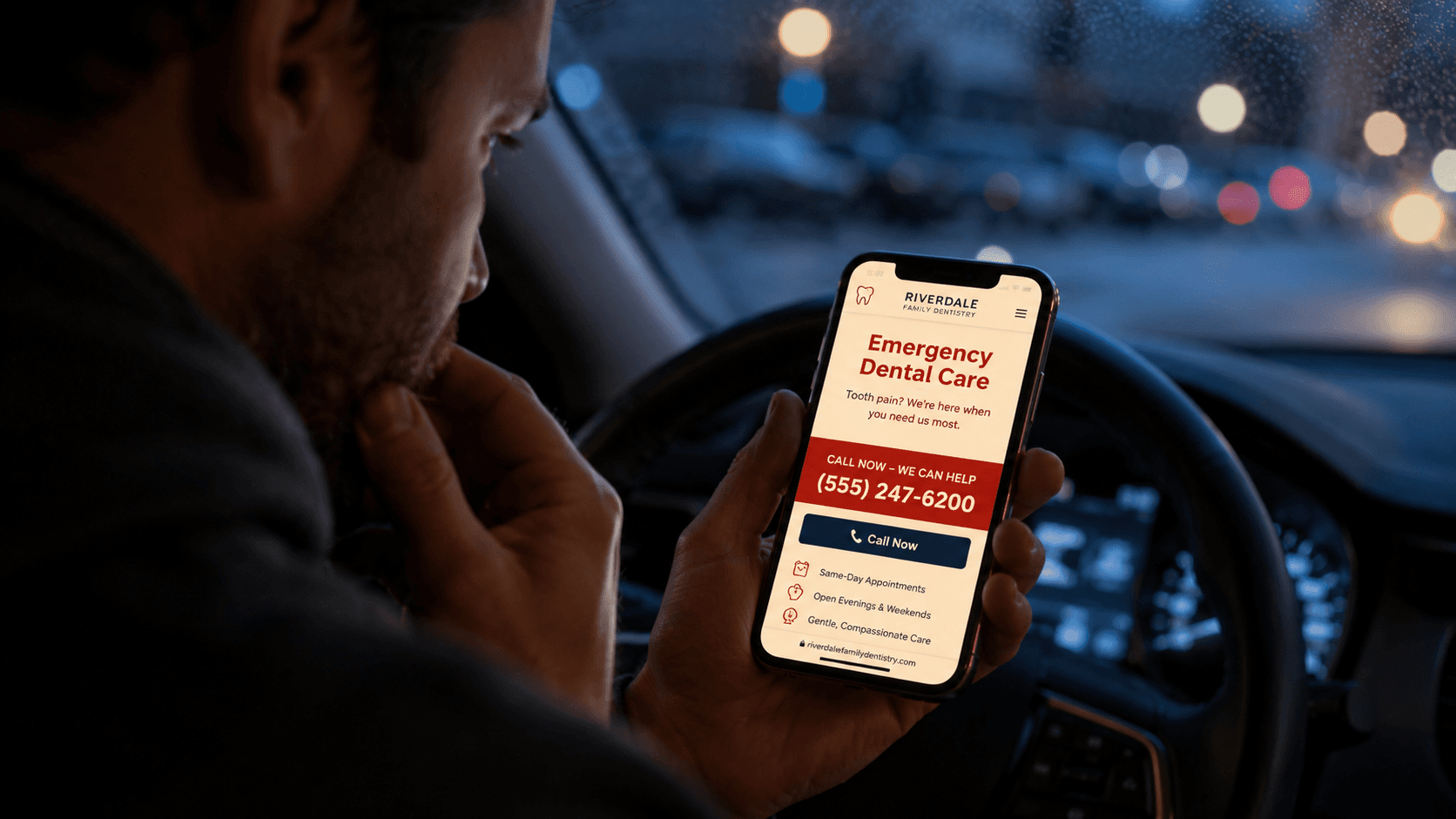
Emergency dental pages have one job.
Get a panicking patient to the phone in under a minute.
That's it. That's the whole brief.
And yet most emergency dentist pages read like a hygiene service page. Soft headline. Stock photo of a smiling family. A paragraph about "compassionate care." A CTA buried two screens down that says "Schedule Your Appointment."
The patient is in pain. The patient's spouse is Googling on a phone in a parking lot. The patient's kid just got hit in the mouth at soccer practice. They're not browsing.
They're trying to make a call.
Most emergency pages get in their way.
Quick answer: The perfect emergency dentist page gets a panicking patient to the phone in under a minute. That means a giant click-to-call number above the fold, a real-time open/closed status, a scannable list of what counts as an emergency, honest after-hours guidance, and cost framing (an emergency exam typically runs $75-$150). Patients give the page 8-10 seconds before they hit back and call the next listing, so speed and clarity aren't optimization here. They're the product.
Here's what the perfect emergency dentist page needs in 2026.
Why Is the Emergency Dentist Page Different From Every Other Service Page?
Because it's the only service page where the patient's job-to-be-done is "call right now." Emergency searches happen during a problem, the search intent is the most commercial in all of dentistry, and the patience is the lowest. Patients give an emergency page about 8-10 seconds before they hit back and call the next listing.
Every other page on a dental site is a research or consideration page. Implants? Weeks of research. Invisalign? Comparison shopping. Sedation? Trust building. Even cleanings are pre-planned.
Emergency is different.
The problem is happening right now. Bleeding. Swelling. Cracked tooth. Knocked-out tooth. Abscess. Lost crown the night before a job interview.
That intensity also shows up in AI search now. Patients asking ChatGPT or Perplexity for "emergency dentist near me" or "what to do for a cracked tooth at 9pm on a Saturday" get pulled into the kind of conversational flow I covered in ChatGPT Local Search for Dentists.
If your page doesn't surface the right answer in the first scroll, the AI won't either.
What Needs to Be Above the Fold on an Emergency Dentist Page?
Five answers in under five seconds: are you open right now, do you treat my problem, what do I do this second (the phone number), can I afford it, and can I get there fast. The phone number is the CTA, the open/closed status is the headline next to it, and the address with a driving estimate closes the loop. Everything else on the page is secondary.
1. Is this office actually open right now?
This is the question that decides whether the patient calls.
Display hours prominently. Not in a tiny footer. Above the fold.
Better: a real-time status indicator.
Open Now. Walk-Ins Welcome Until 7 PM
or
Closed. Call for After-Hours Emergency Line
If you take after-hours calls, say so explicitly. If you don't, say what to do instead (ER for serious cases, what time you open tomorrow).
Honesty beats vague reassurance every time.
2. Is this for someone like me?
Patients arriving on an emergency page are sorting themselves into urgency tiers in real time:
- severe pain that won't stop
- swelling or possible infection
- broken or knocked-out tooth
- lost filling or crown
- chipped tooth
- post-extraction complications
- soft tissue injury
List the conditions you actually treat. The patient with a knocked-out tooth needs to know you can see them in the next hour. The patient with a lost crown can wait until tomorrow.
Tell them which they are.
3. What should I do RIGHT NOW?
Your CTA is the phone number.
Not "Book Online." Not "Schedule Now."
A massive, click-to-call phone number above the fold. On mobile, the entire button is the call link.
Secondary CTA can be online booking. But primary is always the call.
Add one sentence of action guidance:
Call us now. We'll get you in the same day for true emergencies.
Patients in pain don't want to fill out a form.
4. Will they accept my insurance or can I afford it?
Money is the second biggest reason patients hesitate. Even mid-emergency.
Acknowledge it briefly above the fold or just below:
We see emergency patients with or without insurance. Same-day visits, transparent pricing, and financing available.
Skip the marketing copy. State the facts.
If your insurance language is currently vague, Dental Insurance Pages That Actually Rank is the companion fix.
5. Are they close enough to get to?
For emergency search, location matters more than it does for any other dental service.
Surface the address, neighborhood, and a one-line driving estimate from major reference points:
Located in [Neighborhood], 10 minutes from downtown [City] and 5 minutes off [Highway].
If you have a Google Business Profile (and you should), make sure that listing matches the page exactly. Local pack visibility for "emergency dentist near me" is one of the highest-converting placements in all of dental search. Covered the underlying mechanics in Google Business Profile Optimization for Dentists.
What Questions Must the Page Answer Before a Patient Bounces?
Five: what counts as a dental emergency, how fast can you see me, what happens after hours or on weekends, what will it cost, and do I need to be an existing patient. These are the questions a patient is asking out loud while they're on the page, and the answers need to be specific, not reassuring fluff.
What counts as a dental emergency?
Give a clear, scannable list:
- severe or worsening tooth pain
- swelling of the face, gums, or jaw
- knocked-out or partially dislodged tooth
- broken or cracked tooth with pain
- lost filling or crown causing pain
- bleeding that won't stop after 15 minutes
- post-surgical complications
- abscess or signs of infection
And what doesn't count (so they self-route correctly):
- mild sensitivity that's been ongoing
- a chip with no pain
- routine cleaning or check-up
This filtering saves you front desk time and gets the right patient through the door faster.
How fast can you see me?
Patients want a number, not a promise.
Be specific:
We hold emergency appointment slots every day and aim to see true dental emergencies within 1-2 hours of your call.
If you do walk-ins, say walk-ins. If you do triage by phone first, say so.
What if it's after hours or weekend?
This is where most emergency pages fall apart.
If you take after-hours calls, list the after-hours line clearly. If you have weekend hours, list them. If you don't, give honest guidance:
For dental emergencies during our regular hours, call [number]. Outside business hours, leave a voicemail and we'll return your call as soon as we open. If you have severe swelling, difficulty breathing, or trauma to the face, go to the nearest ER.
Patients respect honesty more than fake 24/7 promises that go to a voicemail.
What will it cost?
Patients in pain still care about cost. Sometimes more, because they're already stressed.
Give a useful framing:
- emergency exam: typically $75-$150
- X-ray: $25-$75
- treatment cost depends on the procedure (filling, extraction, root canal, crown)
- financing and payment plans available
- we accept most PPO plans
One paragraph that answers the question saves you ten phone calls.
What if I don't have a regular dentist?
A surprising number of emergency callers don't have a primary dentist. The page should welcome them, not assume them away.
You don't need to be an existing patient. Many of our emergency visitors become regular patients after we resolve their emergency.
That sentence converts long-term revenue.
What Content Blocks Should Every Emergency Page Include?
Nine blocks, and the phone number appears in the first and the last: a hero with click-to-call and open/closed status, a what-counts-as-an-emergency list, a what-to-do-right-now action guide, same-day and after-hours info, cost and insurance, location and directions, FAQ, emergency-patient reviews, and the phone number one more time. If I were rebuilding an emergency page tomorrow, this is the structure.
Emergency page elements checklist
| Block | Job in the panic moment |
|---|---|
| Hero section | H1, giant click-to-call number, open/closed status, address |
| What counts as an emergency | Scannable list. Patient self-identifies in 5 seconds |
| What to do RIGHT NOW | Action guide for knocked-out tooth, broken tooth, abscess, lost crown |
| Same-day and after-hours info | Clear, honest, specific |
| Cost and insurance | Plainly labeled, no hedging |
| Location, hours, directions | Embedded map, driving estimate from key reference points |
| FAQ | The most important block on the page |
| Reviews from emergency patients | Patients in pain trust other patients who were in pain |
| Final CTA | The phone number. One more time. Big |
Block 1: Hero Section
- H1: "Emergency Dentist in [City]"
- one-line value proposition (same-day, walk-ins, after-hours)
- giant click-to-call phone number
- current open/closed status
- address + neighborhood
Block 2: What Counts as a Dental Emergency
Scannable bullet list. Patient self-identifies in 5 seconds.
Block 3: What to Do RIGHT NOW
A small action guide for common emergencies:
- knocked-out tooth: hold by crown, place in milk, call us immediately
- broken tooth: rinse with warm water, apply cold compress, call us
- abscess or swelling: don't apply heat, call us same-day
- lost crown: save the crown if possible, call to schedule
This is the kind of content AI loves, patients save, and Google increasingly surfaces in AI Overviews.
Block 4: Same-Day Appointments and After-Hours Info
Clear, honest, specific.
Block 5: Cost and Insurance
Three sub-blocks. Plainly labeled. No hedging.
Block 6: Location, Hours, Directions
Embedded map. Click-to-call. Driving estimate from key reference points.
Block 7: FAQ
The most important block on the page. We'll come back to this.
Block 8: Reviews from Emergency Patients
This is where reviews actually matter most. Patients in pain trust other patients who were in pain.
Filter for reviews that mention:
- "saw me same day"
- "got me out of pain"
- "took my emergency call"
- "didn't have insurance and they still helped"
If your review mix doesn't include those, How to Get More Google Reviews for Your Dental Practice is the lever.
Block 9: Final CTA
The phone number. One more time. Big.
What Should the FAQ Section Look Like?
Emergency FAQ is a category-killer for AI search visibility. Patients ask the same questions in slightly different ways at all hours of the day and night, and a clean FAQ feeds Google's AI Overviews, ChatGPT's local search results, and Perplexity's citations all at once. It's one of the clearest wins in dental AEO, because the question volume never stops.
The best emergency FAQ entries:
- match the real patient question word-for-word
- answer in one direct sentence
- add one practical detail
- don't ramble
Examples:
Do you take walk-ins for dental emergencies?
Yes. We hold emergency slots every day for walk-in patients. Calling first is recommended so we can prepare for your arrival, but it's not required.
What should I do if my tooth gets knocked out?
Pick up the tooth by the crown (not the root), rinse it gently with water, and place it in milk or hold it in your cheek. Call us within 30 minutes for the best chance of saving the tooth.
Can you see me tonight?
If we're open, yes. Outside regular hours, leave a voicemail at [number] and we'll return your call as soon as possible. For severe swelling or trauma, go to the nearest ER.
Do you treat patients without insurance?
Yes. We see emergency patients with and without dental insurance. We offer transparent pricing and financing options.
That kind of FAQ is useful to a patient and legible to an AI.
What Schema and Technical Elements Matter?
A click-to-call phone number with a large tap target, LocalBusiness or Dentist schema with openingHours defined, FAQ markup that no longer earns a rich result but still feeds the assistants, and a Google Business Profile that matches the page exactly. For an emergency page, the technical layer matters more than usual because phone-call conversions are everything.
Make sure you have:
- click-to-call phone number (tel: link, large tap target on mobile)
- LocalBusiness or Dentist schema with
openingHoursclearly defined EmergencyServicemention in your schema or service descriptions if appropriate- FAQ structured data on the FAQ block. The dropdown died in May 2026, so this wins you nothing in the SERP itself. It still earns its place here, because the 2am questions are the ones an assistant fields when your front desk can't.
- accurate Google Business Profile hours that match the website exactly
Plus the basics, with emphasis:
- page weight under 2MB (emergency searches are mobile-heavy)
- LCP under 2 seconds
- no autoplay video on mobile
- phone number visible without scrolling
- no popup or chat-bot blocking the screen
If a patient in pain can't see your phone number in the first scroll, no schema saves you. Same conversion logic I wrote about in Why Most Dental Websites Don't Convert and Dental Website Speed: Why Your PageSpeed Score Is Costing You Patients.
Emergency pages are where speed and clarity stop being optimization and start being the entire product.
What Does the Perfect Emergency Page Actually Do Better?
It removes friction between pain and a phone call. No form, no popup, no "schedule online" funnel that asks for date-of-birth. Just the answers a patient in pain needs, in under 10 seconds.
The patient is asking:
- Can someone help me right now?
- How do I reach them?
- How long until I'm out of pain?
- What's this going to cost?
- Can I get there fast?
In the current search environment, the page that answers fastest wins.
The competition isn't another dental practice. The competition is the patient hitting the back button.
The Short Version
The best emergency dentist page in 2026 is not the prettiest one. It's the fastest one.
Make the phone number unmissable. Show real-time open/closed status. Tell the patient what counts as an emergency and what to do right now. Be honest about after-hours availability. Acknowledge cost. Surface location and directions. Use a clean FAQ. Keep it fast.
Because the patient on your emergency page right now is in pain.
The page that reaches the phone in under a minute is the page that wins the patient.
Go deeper: More from the Local SEO hub: GBP, local pack, reviews, and the signals that drive same-day phone calls.
Sources
- Removing the FAQ rich result: Google Search Central
- Local Business structured data: Google Search Central
- Dental Emergencies Patient Information: American Dental Association (Mouth Healthy)
- Saving a Knocked-Out Tooth: American Association of Endodontists
Keep reading
All articlesWant to see this in action for your practice?
Book a free discovery call and I'll run a competitive analysis. On the house.
Book a Discovery Call