Google's AI Sidebar and Chrome Skills: What Dentists Need to Know
Pete Johnson
Google shipped two things in one week that most dental practices haven't heard about yet.
On April 14, 2026, Google launched Skills in Chrome, a way to save Gemini prompts as reusable one-click tools that can run across multiple tabs at once.
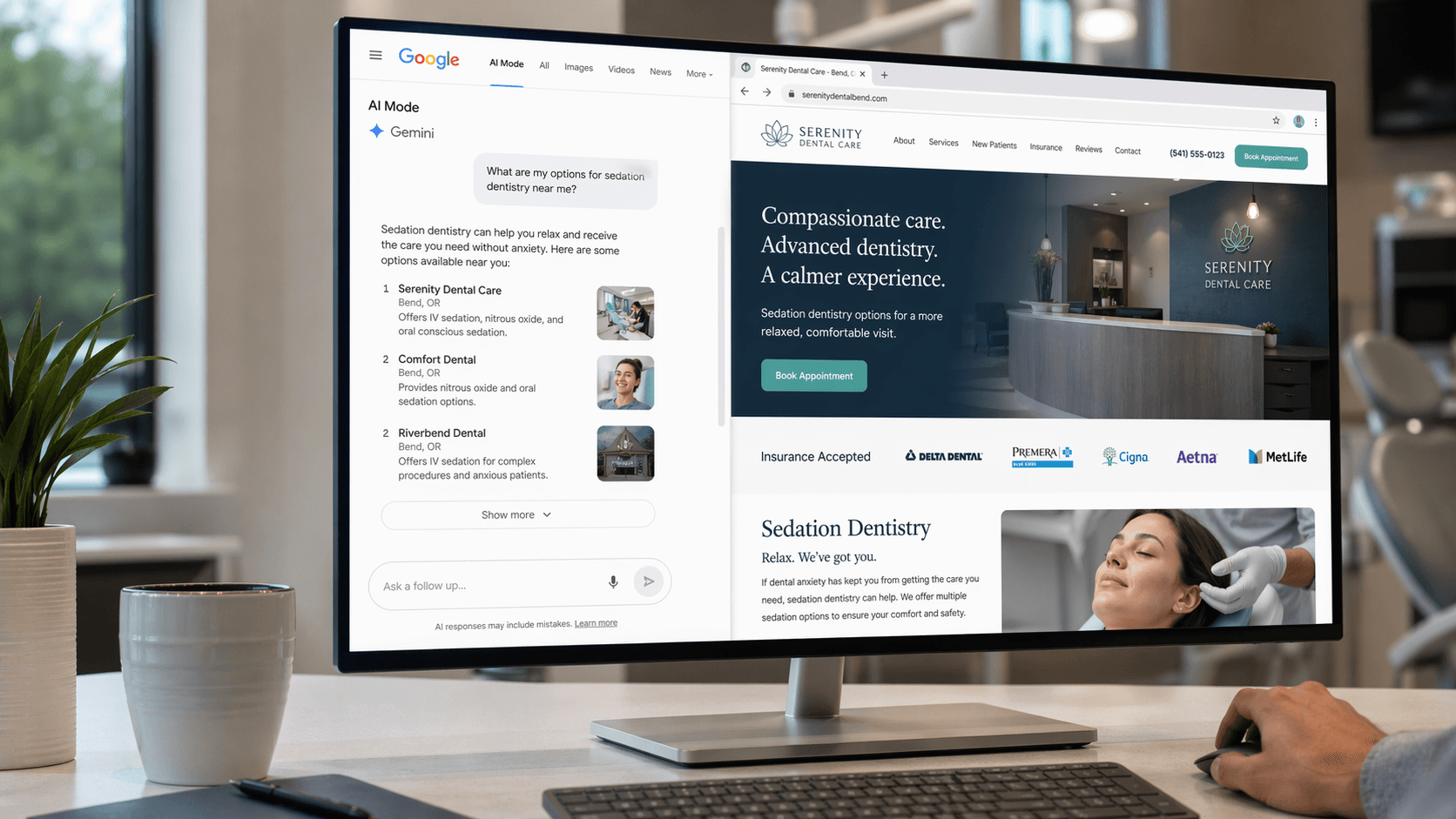
On April 16, Google rolled out a split-view update to AI Mode that opens source pages inside the AI Mode experience. Gemini stays anchored on the left, the website you clicked loads on the right, and the user never has to leave the AI conversation.
Two launches. Two different directions. Both matter to your practice.
One changes how patients search and whether they ever click through to your site. The other changes how much work an SEO can actually get done in a week. Here's the plain-English version and what to do about it.
What Google Actually Shipped
Change #1: AI Mode Split View
If you've ever used AI Mode on desktop and clicked a source link, here's the old behavior: the link opened in a new tab, you skimmed the page, and you either came back to AI Mode or got distracted and forgot it existed.
The new behavior: the source page opens next to AI Mode on the same screen. AI Mode stays live in a sidebar on the left. You can ask follow-up questions about the page you just opened without losing your place in the conversation.
The TechCrunch example uses a coffee maker. Ask AI Mode for recommendations, click one, then ask "how easy is this to clean?" with the retailer's page open next to it.
Now translate that to dental. A patient searches "sedation dentist near me." AI Mode generates a summary of their options. They click through to your practice site. Your site loads in the right pane. But AI Mode is still sitting there on the left, ready to answer "does this dentist take Delta Dental?" or "how does this compare to the other three?"
They're not really on your site. They're on Google's site, with your site inside it.
Change #2: Chrome Skills
Skills is a different kind of update: less visible to patients, more useful to you or your agency.
Here's how it works: you run a prompt in Gemini's Chrome side panel. Something like "audit this page for local SEO issues: title tag, meta description, H1, schema, NAP consistency, internal link structure." Once it runs, you can save that prompt as a Skill from your chat history.
Next time you need it, you type a forward slash, click the Skill, and it runs on whatever page you're viewing, or across multiple tabs at once.
That second part is the one SEOs will actually care about. You can open six practice service pages in tabs, run one Skill, and get a structured comparison across all of them in seconds.
Google is also shipping a library of pre-built Skills. TechCrunch reported the rollout started April 14 for Chrome desktop, English (US) only for now.
Why the AI Mode Update Is a Bigger Deal Than It Looks
I've been saying this for a year: the long-term threat to dental practice websites isn't that AI Mode replaces Google search. It's that AI Mode replaces the click.
The split view is the cleanest version of that threat I've seen shipped.
Under the old AI Mode behavior, a user who clicked through to your practice was on your site. Your analytics caught them. Your forms caught them. Your phone number was there. The browser context was yours.
Under split view, the user is in a hybrid state. Your site is loaded, but the AI is still the interface. They can ask Gemini about your page without reading it. They can compare you against two competitors you never knew were in the consideration set. They can get the exact answer they came for, "does this practice do Invialign?", without scrolling a single pixel on your site.
The BrightEdge data already tells us where this goes. AI Overviews are now on 48% of tracked queries, up from 31% a year ago, a 58% year-over-year jump. Healthcare AI Overview presence is at 88%. Local queries are still comparatively protected (around 7%), but "sedation dentistry cost" and "how long does a root canal take" are exactly the informational queries that AI Mode eats.
Split view makes the problem worse in a subtle way: it extends the AI Mode session. Users stay in the AI context longer because there's no friction to leaving it. Every minute they spend in that sidebar is a minute your site is fighting for attention against a chatbot sitting on the same screen.
What This Means for Your Practice Site
Three things are now load-bearing in a way they weren't six months ago.
1. Get cited in the AI answer, not just ranked below it. If AI Mode is doing the summarizing, your job is to be the source it cites. That means clear question-based H2s ("How much does dental implant surgery cost?"), a direct answer in the first 40-60 words of that section, and structured data (FAQPage schema, MedicalProcedure schema, Dentist schema) labeling all of it. Be clear on which half does the work: Google retired the FAQ rich result, so the markup buys you no dropdown. It just helps machines parse the page. The visible answer is the thing that gets quoted. Most dental sites still skip this, which is good news if you fix it now.
2. Make your above-the-fold count. In split view, your page is rendering in a narrow pane next to Gemini. If your hero section is a giant stock photo with a vague headline, you've wasted the only real estate most users will actually see. Phone number, core service, trust signal, clear CTA, all above the fold, all readable in a split-screen viewport.
3. Answer the follow-up questions your page invites. Users are going to ask Gemini "does this dentist take my insurance?" and "what's the parking like?" while your page is open. If those answers aren't on your site, Gemini will guess, infer, or say "I don't have information on that." Any of those outcomes are worse than you just putting the damn insurance list on the page.
None of this is new SEO. It's the same E-E-A-T playbook your agency should already be running. The split view just raised the cost of not doing it.
The Opportunity Hiding in Chrome Skills
Here's the other side of the week. Chrome Skills is the first time Google has given SEOs a native way to build repeatable AI audits without code.
A handful of Skills worth building immediately if you own or audit dental sites:
- Practice page SEO audit: checks title tag, meta description, H1/H2 structure, internal link count, NAP block presence, and schema markup in one pass.
- Competitor teardown: open your practice site and two competitor sites in tabs, run the Skill, get a side-by-side comparison of positioning, service pages, reviews displayed, and trust signals.
- Content gap finder: run on a competitor's blog index and your blog index, get the topics they cover that you don't.
- Review response draft: feed it your Google Business Profile review URL, get an in-voice response that you can edit and post.
- AI Overview citation check: run on a search results page, get a structured readout of which sites are getting cited for your target keywords.
If you're running a multi-location DSO site, multiply that by every location. A Skill you build once runs across 50 pages in the time it takes to open them in tabs. That's the point.
I've been writing these as one-off prompts for months. Saving them as Skills is the unlock. Not because the prompts are better, but because now they're repeatable without me copy-pasting the same 400 words of instructions every time.
The Playbook
Here's what I'd do this week.
If you run a practice:
- Open AI Mode on desktop Chrome and search "[your service] near me" and "[your city] dentist." Click your own site. See what split view looks like with your page loaded.
- Look at your hero section in that narrow right-side pane. Is the phone number visible? Is the CTA clear? If not, that's your first fix.
- Check which of your service pages answer real patient questions in plain text, with FAQPage markup labeling them. If the answer is "none," that's your second fix. Write the answers first. The schema is the easy part.
If you run an agency or handle SEO internally:
- Update Chrome if you haven't. Confirm Gemini is in your side panel.
- Build your first Skill this week. I'd start with a simple on-page SEO audit. Test it across three client sites. Refine the prompt.
- Build a second Skill for competitor teardowns. If you're doing five of these a month by hand, you're losing an afternoon a week you could spend on strategy.
If you're planning speaking or content for the next quarter: The intersection of AI Mode and local practice marketing is the most under-covered topic in dentistry right now. Practice owners are hearing "AI is coming" from every conference stage and getting zero practical guidance. This is exactly the kind of shift where a speaker who can make it concrete is worth ten more panels about "the future of AI."
The Short Version
Split view makes AI Mode stickier and makes your site easier to ignore. Chrome Skills make it possible to audit practice sites at scale without hiring more people. Both shipped in the same week. Neither was on most dental practices' radar.
Fix your above-the-fold. Add the schema. Build the Skills. The practices that do this in April are going to have a six-month lead on the ones still asking their agency "what's AI Mode?" in October.
Got it? Good. Let's go.
Go deeper: More from the AI in Dentistry hub: AI search visibility, automation, and what's actually changing for dental practices right now.
Going deeper on AI search? The Dental AEO Guide is the 6,000-word playbook on getting cited by ChatGPT, Perplexity, and Google AI Overviews: schema, content architecture, the 90-day implementation roadmap, and where AI search is going next.
Sources
- Google rolls out side-by-side AI and web results in Search AI Mode: TechCrunch
- Google adds AI Skills to Chrome to help you save favorite workflows: TechCrunch
- Google Chrome Skills Turn Gemini Prompts Into Reusable Workflows: Search Engine Journal
- Google announces 'Skills' for Gemini in Chrome: 9to5Google
- Google AI Overviews Surge 58% Across 9 Industries: ALM Corp / BrightEdge data
- Google's AI Mode Update Aims to Eliminate Tab Switching in Chrome: Altagic
- Google Testing Jumping To AI Mode Directly From AIOs on Desktop: Search Engine Roundtable
Keep reading
All articlesWant to see this in action for your practice?
Book a free discovery call and I'll run a competitive analysis. On the house.
Book a Discovery Call